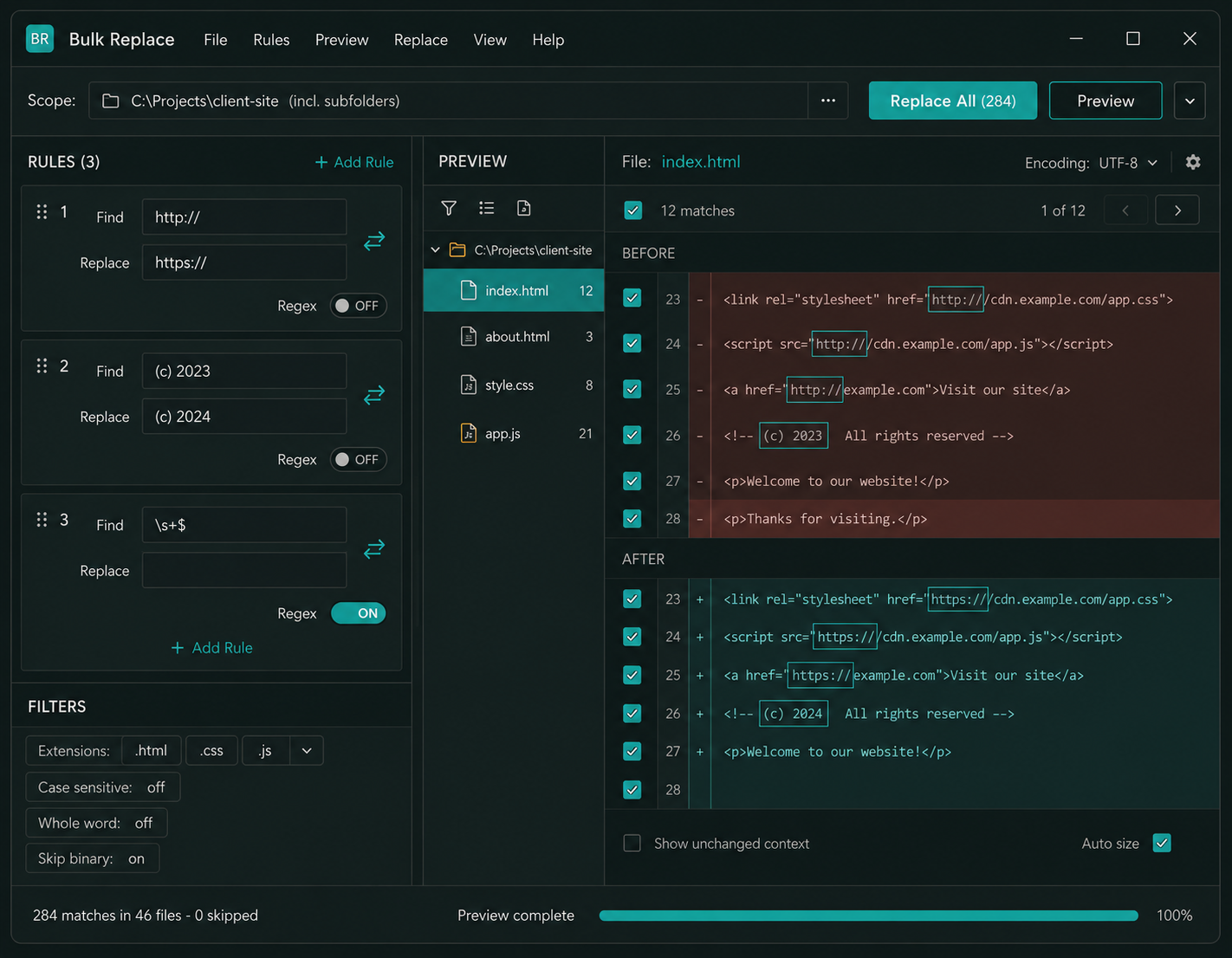
Bulk Replace runs a find & replace across an entire folder tree at once - source code, config files, HTML, CSV, plain text and more - on your own Windows PC. Stack multiple replacement rules into a single run, switch on full regular expressions for the tricky jobs, preview every change in a before/after diff, and apply it all with one click. Every run is backed up automatically, so a project-wide rename, a broken-URL sweep or a code refactor that used to take an afternoon is done in seconds - and undone just as fast.
Bulk Replace is built for developers, web masters, technical writers, translators, system administrators and anyone who keeps content in files. Sweep a change across an entire project at once - with full regular expressions, stacked replacement rules, a live before/after preview and automatic backups - all on your own PC, with no files ever leaving your machine and no monthly fees.
Point Bulk Replace at a folder and it scans every file inside, finds every match and applies your replacements across the whole set in a single operation. A change that would take hours of opening files one at a time is finished in seconds - whether it is ten files or ten thousand.
Include subfolders to sweep an entire project tree, or restrict the job to a single directory. Bulk Replace walks the full folder hierarchy automatically, so a nested website, source repository or document library is handled in one run with no manual folder-by-folder work.
Switch any rule to regex mode for the jobs simple text cannot handle. Use capture groups, back-references, anchors, character classes and look-arounds to match patterns rather than fixed strings - perfect for reformatting dates, rewriting URLs, cleaning up code or normalising whitespace across an entire codebase.
Stack as many find & replace rules as you need into a single replacement set and Bulk Replace applies them all in order during one run. Migrate a whole list of old strings to new ones, swap an entire colour palette or rename dozens of terms at once - no need to run the tool over and over.
Before a single byte is written, Bulk Replace shows you exactly what will change in a clear before/after diff, file by file, with every match highlighted and a total match count. Review everything, untick any file or match you want to skip, and only then apply - so you are never guessing about what a replacement will do.
Every run creates a timestamped backup of every file it touches before any change is written. If a replacement does not turn out the way you expected, one click restores the entire job to exactly how it was. Make sweeping changes across thousands of files with the confidence that nothing is ever lost.
Fine-tune every rule with case-sensitive or case-insensitive matching, whole-word boundaries, and wildcard support for the cases between plain text and full regex. Match exactly what you mean and nothing else, so a search for "cat" never rewrites "category" unless you want it to.
Limit a run to specific extensions - only .html and .css, only .php, only .txt - or include everything. Layer on size, modified-date and hidden-file filters, and Bulk Replace skips binary files automatically so images and executables are never corrupted by an accidental text replacement.
Match and replace text that spans several lines - whole HTML blocks, multi-line comments, function bodies or repeated headers and footers. Bulk Replace treats your find pattern across line breaks so you can rewrite or remove entire sections of a file, not just single words.
Bulk Replace is not limited to file contents - it can find and replace inside file and folder names as well. Rename a batch of files to a new naming scheme, strip an unwanted prefix or swap a version number across an entire directory in the same run that updates the contents.
Keep your find and replace pairs in a spreadsheet and import them as a ready-to-run rule set in one step. Ideal for translation glossaries, terminology updates, brand-name migrations and large data corrections where dozens or hundreds of substitutions need to be applied consistently across many files.
Bulk Replace detects and preserves each file's text encoding - UTF-8, UTF-8 with BOM, ANSI, UTF-16 and more - so accented characters, symbols and non-Latin scripts survive a replacement intact. Optionally convert files to a target encoding as part of the run when you need to standardise a mixed project.
Save a complete configuration - target folder, file filters, every rule and all match options - as a named project you can reload and re-run any time. Recurring jobs like a release-day URL sweep or a routine clean-up become a two-click task instead of a fresh set-up every time.
Every run produces a full report: which files were changed, how many matches were replaced in each, which were skipped and why, with a timestamp for the whole job. Export the report as CSV for your records, code review, audit trail or to hand to a client or colleague as proof of exactly what was done.
Drag a folder or a selection of files straight onto the Bulk Replace window to set your scope instantly - no browsing through dialog boxes. Combined with saved projects and a results list you can search and filter, it keeps even very large jobs fast and comfortable to drive from start to finish.
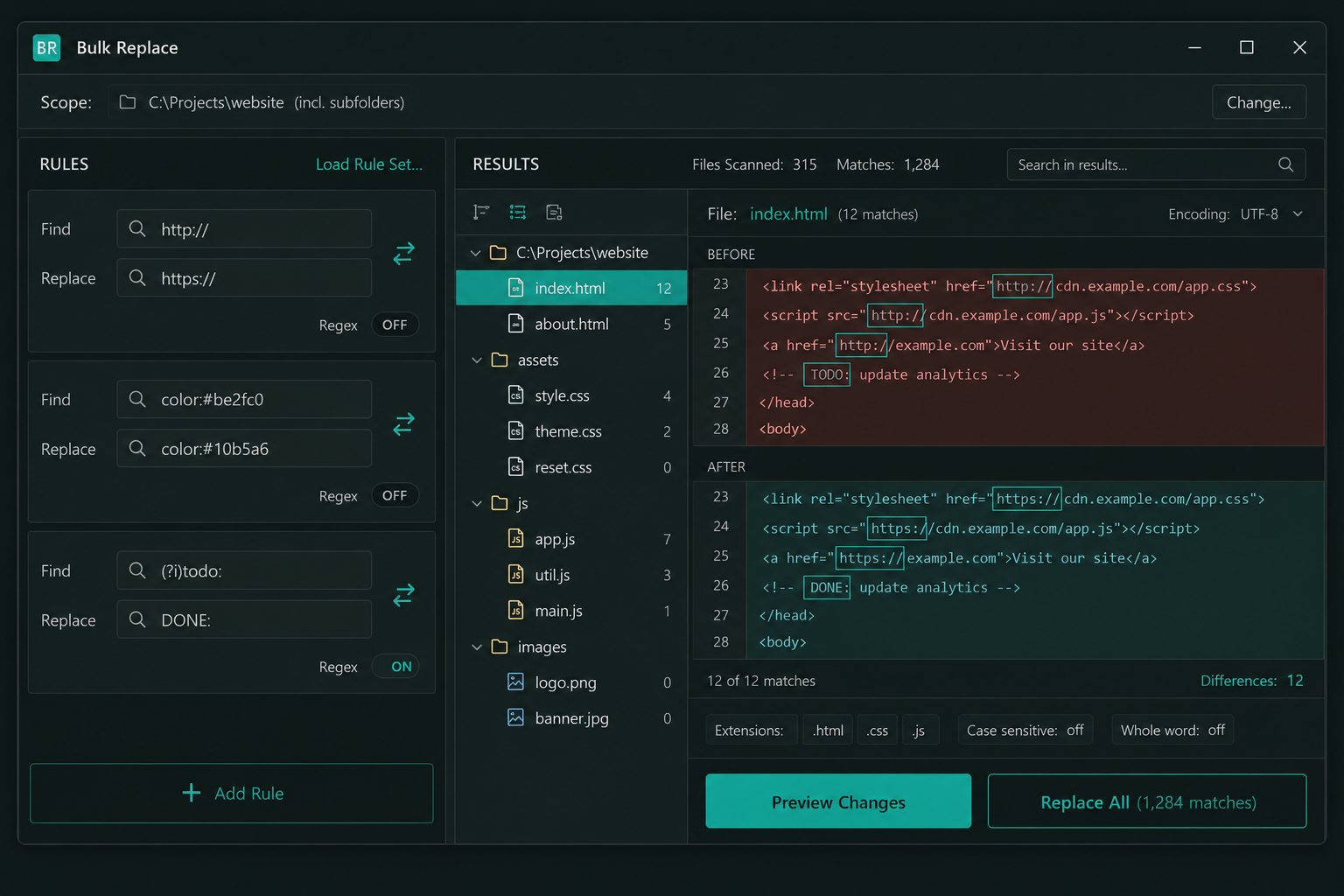
No command line. No scripting. No risk of losing your work. If you can fill in a Find box and a Replace box, Bulk Replace does the rest - scanning, matching, previewing, backing up and replacing.
Drag a folder onto the window or browse to it, then tick "include subfolders" to sweep the whole tree. Add extension, size and date filters if you only want to touch certain files.
Type what to find and what to replace it with. Stack as many rules as you need, flip on regex, case-sensitivity or whole-word matching per rule, or import a whole rule set from a CSV file.
Bulk Replace shows a before/after diff for each file with total match counts. Review the results, untick anything you want to leave alone, and confirm exactly what will happen before it happens.
Click Replace All. Bulk Replace backs up every file first, applies your changes, and writes a timestamped report you can export as CSV. Not happy? One-click undo restores the whole job instantly.
Whether you are a developer refactoring a codebase, a web master sweeping a site for outdated links, a technical writer updating terminology across a documentation set, or a translator applying a glossary to hundreds of files - Bulk Replace handles the whole job from a single Windows application that runs entirely on your own PC. Your files never leave your machine.
"We migrated an entire legacy site from http to https and rebranded the colour palette in the CSS at the same time. With Bulk Replace I stacked the URL rule and the colour rules into one set, ran it across about 1,400 files, checked the diff preview and applied it in under a minute. The automatic backup meant I could experiment without fear. This used to be a whole-day job with a script I had to babysit."
"I look after a large documentation set and we constantly rename products and features. Bulk Replace lets me keep all the old-to-new terms in a spreadsheet, import them as a rule set and sweep the whole folder of Markdown files in one go. The before/after preview catches anything I would not want changed, and the CSV report is perfect evidence for our review process. Honestly the best $19.95 the team has spent."
"As a sysadmin I am forever editing config files across servers - paths, ports, hostnames, the lot. The regex support and whole-word matching mean I can target exactly the right strings and nothing else, and skip-binary keeps me from ever damaging a file I should not touch. Saved projects turn our recurring jobs into a two-click task. It does one thing and does it extremely well, with no cloud and no subscription."
No subscription, no per-file charges, no cloud account. Pay once, download instantly and run Bulk Replace on your own Windows PC for as long as you like - free updates included.
One-time payment - instant download after purchase
Enter your details below and click the button to pay securely via PayPal. Your download link appears instantly after payment is confirmed.
Bulk Replace finds and replaces text and code across many files at once. You point it at a folder (optionally including subfolders), tell it what to find and what to replace it with - using plain text, wildcards or full regular expressions - and it applies that change across every matching file in a single run. It is ideal for tasks like updating URLs across a website, refactoring strings in a codebase, applying a terminology change across documentation, or correcting the same mistake in hundreds of files at once.
There is no fixed limit. Bulk Replace is designed to handle anything from a handful of files to many thousands in a single run. It scans the folder tree you choose, processes every matching file in sequence, and shows progress as it goes. Performance depends on the number and size of your files and your PC, but sweeping a large project of several thousand text and code files typically takes seconds rather than minutes.
Yes. Every rule can be switched between plain-text mode and full regular expression mode independently. In regex mode you have capture groups, back-references, anchors, character classes, quantifiers and look-arounds available, so you can match patterns rather than fixed strings - reformatting dates, rewriting structured URLs, normalising whitespace, or extracting and rearranging parts of a match using back-references in your replacement text. Plain-text mode is there for the everyday jobs where you just want to swap one exact string for another.
No - nothing is written until you say so. Bulk Replace runs a preview pass first and shows you a before/after diff for every affected file, with each match highlighted and a total match count. You can review the results file by file and untick any individual file or match you want to leave untouched. Only when you click Replace All does it write the changes, and even then it creates a backup of every file beforehand so the whole run can be undone in one click.
Yes. Before any run writes changes to disk, Bulk Replace saves a timestamped backup of every file it is about to modify. If the result is not what you wanted, a single Undo restores every file in that job to exactly how it was. Backups are kept per run so you can roll back a specific operation even after you have done other work, giving you the confidence to make sweeping changes across thousands of files.
Yes. You can stack as many rules as you like into a single replacement set, and Bulk Replace applies them all in order during one run across your chosen files. This is perfect for migrations where many old strings map to new ones, swapping an entire colour palette in your stylesheets, or applying a long glossary of term changes. You can also import a whole rule set from a CSV file, which makes managing large lists of substitutions in a spreadsheet straightforward.
Bulk Replace works with any plain-text or code file - including .txt, .html, .css, .js, .php, .xml, .json, .csv, .md, .sql, .py, .java, .cs, .ini, .conf, .log, .srt and many more. You can filter a run to specific extensions, or include everything. It detects and skips binary files such as images, executables and archives automatically, so they are never corrupted by an accidental text replacement. You can also define your own custom extensions for any text-based format the tool does not list by default.
Yes. Bulk Replace detects each file's encoding - UTF-8, UTF-8 with BOM, ANSI, UTF-16 and others - and preserves it when writing the file back, so accented characters, currency symbols and non-Latin scripts come through a replacement intact. If you need to standardise a mixed project, you can optionally convert files to a single target encoding as part of the same run.
Yes. As well as searching and replacing inside file contents, Bulk Replace can find and replace text inside file names and folder names. That lets you rename a batch of files to a new scheme, strip an unwanted prefix or suffix, or update a version string across a whole directory - in the same run that updates the contents, or as a job on its own.
No. Bulk Replace runs entirely on your own Windows PC. Your files are read and written locally and nothing is ever uploaded, sent to a server or stored in the cloud. There is no account to create and no internet connection required to use it. This makes it well suited to confidential source code, client work and any environment where data must stay on the machine.
Yes. You can save a complete configuration - the target folder, your file filters, every rule and all the match options - as a named project. Reload it any time to re-run the same job in two clicks. This is ideal for recurring tasks such as a release-day URL sweep, a routine code clean-up, or applying the same glossary to a folder that receives new files regularly.
Yes. Every run produces a detailed log showing which files were changed, how many matches were replaced in each, which files were skipped and why, all stamped with the date and time of the job. You can export this report as a CSV file for your own records, for code review, for an audit trail, or to hand to a client or colleague as evidence of exactly what was done across the project.
Bulk Replace runs on Windows 7, 8, 10 and 11 (32-bit and 64-bit). It is a lightweight desktop application with a small download and a fast install, and it does not require any additional frameworks, runtimes or cloud services to operate. Once installed it works fully offline.
One-time payment of $19.95. You own the software outright with no monthly fees, annual renewals or per-file charges of any kind. Free software updates are included as part of your purchase for the lifetime of the product. After payment your download link is delivered instantly so you can install and start using Bulk Replace straight away.